
QR Menu
QR Menu System for Restaurants
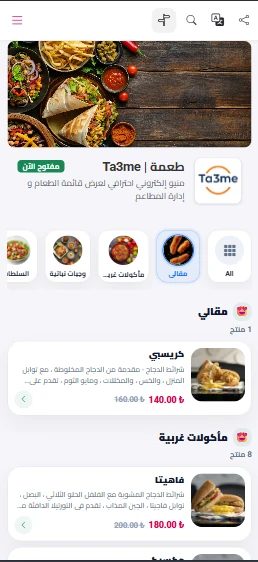
Ta3me's QR menu system lets restaurants and cafés publish their digital menu through a QR code. The guest scans the code with their phone and the menu opens straight in the browser — no app download required.
- Opens in the phone browser, no app to install
- Menu content in Turkish, Arabic and English
- Updates appear on the menu instantly
The limits of a printed menu
Changing a price or a dish on a printed menu means redesigning and reprinting it — time and cost every time, and the menu is often out of date anyway.
A digital QR menu removes that cycle. You edit categories, items and prices from the dashboard, and the change goes live behind the same QR code instantly, with no new code to print.
How the QR menu works
From building the menu to the code on the table, the process has four steps.
Build the menu
Add categories, items, descriptions and prices from the dashboard. Item photos make the menu easier to read.
Set the languages
Enter menu content in Turkish, Arabic and English. Right-to-left is supported for Arabic.
Publish the code
Place the QR code generated for your menu on tables, the counter or the window.
Keep it current
When a price or item changes you edit it in the dashboard, and the same QR code always opens the up-to-date menu.
What the QR menu gives you
Instant updates
Publish price and item changes without waiting for a reprint.
Three languages
The menu appears in Turkish, Arabic or English to match the guest's language.
No app needed
The guest scans the code and the menu opens in the browser — no install, no download.
Per-table codes
Codes can be split per table to tie the menu to a specific table.
QR menu — frequently asked
Do my customers need to download an app?
No. The guest scans the code with their phone camera and the menu opens directly in the browser, with no install.
How many languages can I publish the menu in?
You can enter menu content in Turkish, Arabic and English, with right-to-left support for Arabic.
Do I need to print a new code when I update the menu?
No. The code is fixed; you update the content from the dashboard and the same code always opens the current menu.
Can I add item photos?
Yes. You can add a photo to each item.
Related solutions
Publish your QR menu with Ta3me
Leave a short trial request and our team will help you set up the menu and QR code.